Mostrando entradas con la etiqueta English. Mostrar todas las entradas

viernes, 29 de mayo de 2015

Text with image!

Hello! In this post I'm showing you three images made with gimp. They have text filled with pictures. 
I hope you like it!


XOXO

miércoles, 27 de mayo de 2015

Beauty edit!

Hi! In this post I'm showing you the image that I have edited with gimp. I think the woman looks great now!

Before


After


XOXO

Warhol!

Hello everybody! Here you can see my Warhol edit by Gimp.
I hope you like it!


XOXO

miércoles, 1 de abril de 2015

Lions on the beach!

Hello! Here it is my gimp picture of some lions on the beach. I hope you like it and try to do your own pictures.


XOXO

lunes, 16 de marzo de 2015

Fallas!

Hello everybody! In this post I'm very happy to share with you my Falla's poster. I hope you spend a great time this Fallas and you like it!


XOXO

miércoles, 11 de febrero de 2015

About Gimp!

Hello everybody! In this post I'm going to answer some interesting questions about Gimp. I hope it's useful for you!


1-What's Gimp?


It's a free and open-source raster graphics editor used for image retouching and editing, free-form drawing, resizing, cropping, photo-montages, converting between different image formats, and more specialized tasks.


2-How can you get Gimp and use it in your computer, at home?


You can download it through these links:


3-Make a list of windows in Gimp.

  •  The main dock window (Formally this is actually 
        called the Empty Image window)
  •  An assortment of selection-making tools
  •  A menu of selection operations
  • Tool box

4-Make a list of words related with digital image.

  •  Grid
  •  Pixels
  • Printing
  • Resolution
  • Size
  • Pixels per inch
  • Camera
  • Resolution value

5-Make a list of words related with using Gimp.

  • TIFF or JPEG file
  •  Layers
  •  Selection mask
  •  Set of channels
  •  Set of paths
  •  Windows
  • Program
  • Tool box
  • Functions
  • Settings
  • Tool
  • Brushes
  • Patterns 
  • Gradients
  • The main dock window
  • Menu
6-Why do we use layers?

Because you can draw on each paper, but still see the content of the other sheets through the transparent areas. You can also move one sheet in relation to the others.


7-Is it important to make a selection, when using Gimp?


 Yes, it is, because when modify an image, you only want a part of the image to be affected. The “selection” mechanism makes this possible. Each image has its own selection, which you normally see as a moving dashed line separating the selected parts from the unselected parts.


8-What can you find out in Internet about me?


In Internet I've found the Gimp logo in different ways, these are some examples:


 XOXO

lunes, 9 de febrero de 2015

Presentation About Me!

Hello everybody! In this post I'm going to explain you some little "problems" about Drive.
I've tried to upload my LibreOffice presentation to Drive and convert it into Google format to insert it in this blog, but I couldn't because it was impossible to convert the presentation. Finally, I decided to upload the PDF presentation and it doesn't change anything.

I hope you use this information when you use Drive.


This is the link to my presentation in Drive:

https://drive.google.com/file/d/0B9rv3Ez2YQnlQm4wSnZnTkdfSUk/view?usp=sharing


XOXO

lunes, 12 de enero de 2015

How can you publish your presentation in your blog?

Hello everyone! In this post I'm going to explain how to publish a Drive Presentation in a blog. Maybe you're wondering why a Drive Presentation and not an ordinary presentation like PowerPoint... That's because it's easier to publish a presentation which is directly created on the Internet and you can be sure that your presentation won't have any changes.


 1. Go to Drive and create your presentation.


2. Open your presentation ang go to file.


3. In File, go to Publish in the web


4.Go to Embed and copy the link.


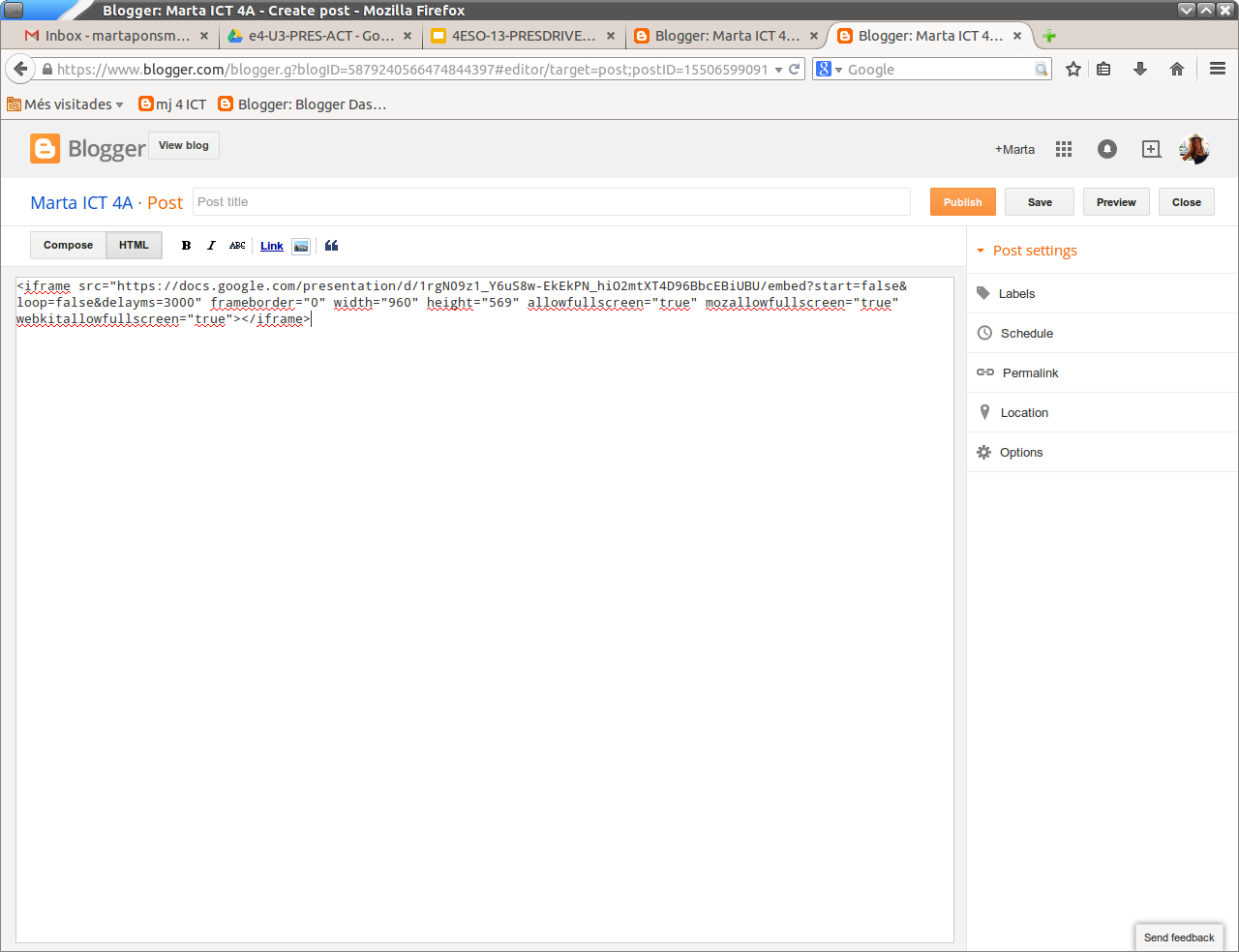
5. Go to your blog, make a new post, enter to HTML and copy the link there.


Here you can see my own presentation made with Drive, I hope you like it!

XOXO


viernes, 12 de diciembre de 2014

Merry Christmas!

Hello everyone!  I'm glad to wish you a merry christmas and a happy new year with my own animated gif. I really hope you like it!


My best wishes for all of you, XOXO

miércoles, 26 de noviembre de 2014

Operating System!

Hi! In this post I'm going to talk about operating systems.

First, I'd like to give you a definition, so you can understand it better:


"An operating system (OS) is a set of programs that manage computer hardware resources and provide common services for application software. The operating system is the most important type of system software in a computer system. A user cannot run an application program on the computer without an operating system, unless the application program is self booting"


Now that you know what an operating system is it's interesting you know which operating systems are most used:
 
Most desktop or laptop PCs come pre-loaded with Microsoft Windows or Mac OS X. Many corporate servers use the Linux or UNIX operating systems. 


Here you can see a pie chart with the most used operating systems in 2014 with percentages.


 Finally, here it is a list of words related to operating systems and ICT. I think it's very useful, don't you?


- Computer hardware
- Application software
- System Software
-Desktop
- Laptop
- Internet
- Cell phones
- Batch jobs
- Internal Memory 


XOXO

lunes, 20 de octubre de 2014

How to change your blog!

Hi! In this post I'm going to explain you all the steps so that you can decorate your blog and also follow and subscribe to the teacher's blog.

I'd also like to explain you the difference between follow and subscribe, because it's very important: 

- Following means that you want to get updates from that user/stream.

- Subscribing means you will start receiving, from this moment and directly in your computer, all the news that are published in this web page or blog, without need to visit the web page.

I hope you use this!


- Change settings in your blog: Overview>Settings (left)


- Become follower of the teacher's blog: Enter in your teacher's blog>Join this site (right)


- Subscribe to the teacher's blog: Enter in your teacher's blog>Subscribe by email   (right)>Copy your email address


- Add gadgets on your blog: Overview>Layout (left)> Add a gadget> Add any gadgets you like


XOXO


lunes, 13 de octubre de 2014

Link to my teacher's blog!

Hello everyone! Here it is the link to my teacher's blog, where you can find good information about ICT, computer hardware...

I hope this is useful for you!

Link: http://mj4ict.blogspot.com.es/


XOXO


lunes, 29 de septiembre de 2014

Change into English!

Hi everyone! Here it is a post about how to change Google, your bolg, etc. into English. I hope this information it's useful for you!

XOXO

-Change the Operating System: in LLiurex you can change the language into English before you log in, in the upper right corner.


-Change to English in Google: go to Eines>Eines d'idioma de Google>Anglés


-Change your Gmail account into English: Gmail>Canviar idioma


-Change your blog into English: go to blogger.com>Idioma>Anglés UK


-Edit your blog in English: blogger>Idioma>Anglés UK